Introduction to Data Engineering on Google Cloud
Module 1: Introduction to Data Engineering on Google Cloud
- The Role of the Data Engineer
- At a basic level, a data engineer builds data pipelines. The entire purpose of these pipelines is to get data into a usable condition and deliver it to a place (like a dashboard, a report, or a machine learning model) from where the business can finally make those data-driven decisions.
- Data Sources versus Data Sinks
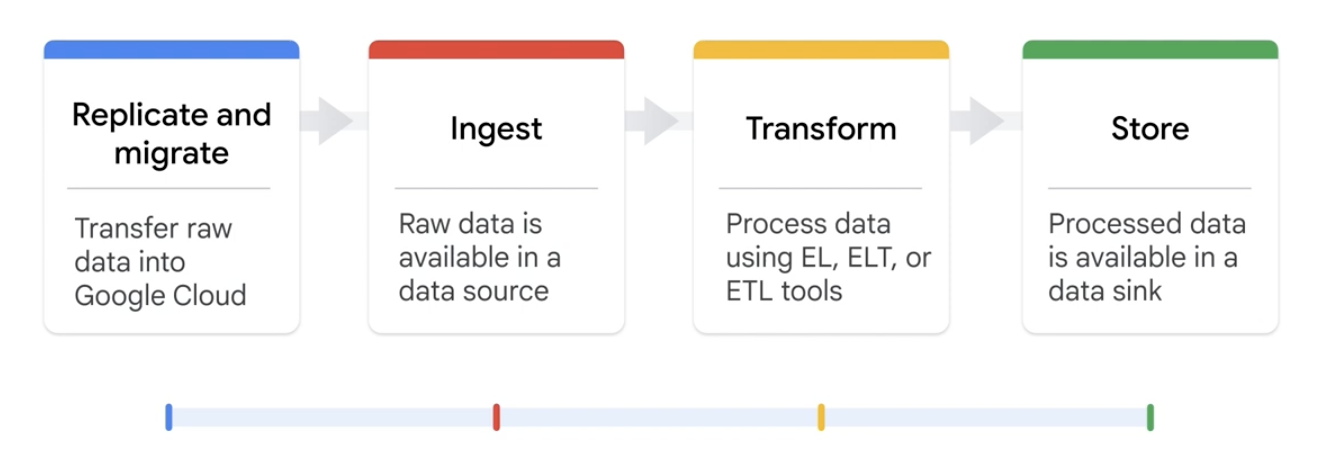
In the most basic sense, a data engineer moves data from data sources to data sinks in four stages: replicate and migrate, ingest, transform, and store.
-
Replicate and Migrate
- Before you can work with data, you need to get it from all its different sources. This first stage focuses on the tools and options to bring data from external or internal systems into a central environment (like Google Cloud) for further refinement. There are a wide variety of tools and options at a data engineer's disposal to accomplish this.
-
Ingest
- Once a path is established, the data needs to be ingested, or brought into the new system. This step involves the technical processes of loading the raw data, whether in real-time streams or in scheduled batches.
- Detailed Explanation: The ingest stage is where raw data officially enters the data pipeline, becoming a "data source" ready for subsequent processing. It's the initial point of the data's journey, where it exists in its original, unprocessed form, awaiting transformation into valuable insights.
- What is a Data Source? Any system, application, or platform that generates, stores, or shares data can be considered a data source.
- Google Cloud Products for Ingestion:
- Cloud Storage: Functions as a data lake, capable of holding diverse types of data sources. It's highly scalable and durable.
- Pub/Sub: An asynchronous messaging system designed for delivering data from external systems. It enables real-time data ingestion and stream processing.
-
Transform
- This is often where the real magic happens. As we mentioned, raw data is rarely useful. In the transform stage, the data engineer applies updates, business rules, and other transformations to clean, organize, and add new value to the data. This could mean joining datasets, standardizing formats, or calculating new metrics.
- Detailed Explanation: The transform stage involves taking specific actions on the ingested data to adjust, modify, join, or customize it. The goal is to ensure the data meets the specific requirements of downstream applications, reporting tools, or analytical models. This stage is crucial for refining raw data into a usable and meaningful format.
- Main Transformation Patterns:
- Extract and Load (EL): Data is extracted from the source and loaded directly into the destination, with transformation happening after loading, often within the destination system itself.
- Extract, Load, and Transform (ELT): Similar to EL, but explicitly highlights that transformations occur once the data is loaded into the target system (e.g., a data warehouse). This pattern leverages the processing power of modern data warehouses.
- Extract, Transform, and Load (ETL): Data is extracted from the source, transformed before being loaded into the destination system. This is a traditional approach where transformations are performed by a separate processing engine.
-
Store
- After the data is transformed into a high-quality, usable state, it needs a permanent home. This stage involves storing the processed data in a system like a data warehouse or data lake, where data analysts, data scientists, and business users can easily access it.
- Detailed Explanation: The store stage is the final step in the data pipeline, where the data, now in its refined and final form, is deposited into a "data sink." A data sink represents the ultimate destination for processed and transformed data, making it available for future use, analysis, and informed decision-making. It's analogous to a reservoir collecting valuable information, readily accessible for consumption.
- Google Cloud Products for Storage:
- BigQuery: A serverless, highly scalable, and cost-effective multi-cloud data warehouse designed for business intelligence and large-scale analytics.
- Bigtable: A fully managed, petabyte-scale NoSQL database service suitable for large analytical and operational workloads, especially those requiring high throughput and low latency.
-
Data Formats
- Data in the real world comes in various shapes and sizes, which can be broadly categorized into two primary formats: unstructured and structured. Understanding these formats is crucial for choosing appropriate storage and processing methods.
- Unstructured Data:
- Definition: Information that does not have a pre-defined data model or is not organized in a pre-defined manner. It doesn't reside in a fixed field within a record or file.
- Characteristics: Highly varied and often contains text-heavy content, dates, numbers, and facts. It can be human-generated or machine-generated.
- Examples: Documents (text files, PDFs, emails), images, audio files, video files, social media posts, web pages, log files.
- Best Suited For: Typically suited for object storage solutions like Cloud Storage due to its flexibility and scalability for large binary objects.
- Note on BigQuery: While primarily a data warehouse for structured data, BigQuery also offers the capability to store and query unstructured data via object tables, allowing for analysis of media and document files directly.
- Structured Data:
- Definition: Information that adheres to a pre-defined data model and is therefore easy to organize and store in tables. It usually resides in fixed fields within a record or file.
- Characteristics: Highly organized and predictable, enabling easy searching, analysis, and processing.
- Examples: Relational databases (SQL tables), spreadsheets (Excel), delimited files (CSV), transactional data, sensor data organized in a schema.
-
Storage Solution Options on Google Cloud
- Google Cloud offers a comprehensive suite of storage and database services, each optimized for specific data formats, access patterns, and performance requirements. The choice of solution is not "one-size-fits-all" and heavily depends on your application's needs and workload characteristics.
- Cloud Storage (for Unstructured and Semi-structured Data):
- Nature: An object storage service designed for storing and accessing unstructured binary data from anywhere in the world. It provides high availability, durability, and scalability.
- Access: Objects are accessed primarily using HTTP requests. This allows for flexible retrieval, including ranged GETS to retrieve only specific portions of a large file, which is efficient for video streaming or partial data processing.
- Object Key: The fundamental identifier is the object name. The object itself is treated as an opaque sequence of unstructured bytes. While there is object metadata (e.g., content type, creation date), the storage service doesn't interpret the content body.
- Use Cases: It scales exceptionally well for serving large static content (e.g., website assets), accepting user-uploaded content (e.g., videos, photos, application files), and storing any form of unstructured data. Each object can be up to 5 terabytes in size.
- Core Attributes: Built for extreme availability, eleven-nines (99.999999999%) durability, massive scalability, and strong consistency (read-after-write consistency for all operations).
- Ideal Solution For: Hosting static websites, storing images, videos, various types of objects and blobs, and generally any unstructured or semi-structured data that doesn't require complex transactional database features.
- Four Primary Storage Classes (differentiated by expected access frequency and cost):
- Standard Storage: Designed for frequently accessed data, offering low latency and high throughput. Ideal for web content, mobile apps, and interactive workloads.
- Nearline Storage: Cost-effective storage for data accessed less than once a month. Suitable for backups, disaster recovery, and long-tail content.
- Coldline Storage: Even lower cost for data accessed less than once a quarter. Designed for archives, compliance data, and older, less frequently accessed backups.
- Archive Storage: The lowest-cost option for data accessed less than once a year. Perfect for long-term archives, regulatory compliance, and cold disaster recovery.
- Storage Solutions for Structured (and some Semi-structured/Unstructured) Data:
- Cloud SQL: Google Cloud's fully managed relational database service. Supports MySQL, PostgreSQL, and SQL Server. Ideal for traditional relational applications requiring transactions and structured queries.
- AlloyDB for PostgreSQL: A fully managed, high-performance PostgreSQL-compatible database service designed for demanding enterprise workloads. Offers significantly faster performance than standard PostgreSQL and advanced analytics capabilities.
- Cloud Spanner: Google Cloud's globally distributed, strongly consistent, and horizontally scalable relational database service. It combines the benefits of relational databases (ACID transactions) with the scalability of NoSQL databases, making it suitable for mission-critical applications at global scale.
- Firestore (formerly Cloud Firestore): A fast, fully managed, serverless, NoSQL document database. It's built for automatic scaling, high performance (low-latency data access), and ease of application development, especially for mobile, web, and IoT applications requiring real-time synchronization.
- Cloud Bigtable: A high-performance NoSQL database service, ideal for large analytical and operational workloads that require very high throughput and low-latency access. It's built for fast key-value lookups and supports consistent sub-10 millisecond latency, making it suitable for real-time analytics, personalization, and IoT data processing.
- BigQuery: While primarily a data warehouse (discussed in detail below), it functions as a highly scalable storage solution for structured data, and also supports unstructured data through object tables.
-
Data Lake vs. Data Warehouse
- These two architectural patterns are fundamental in modern data engineering for storing and managing large volumes of data, but they serve different purposes and have distinct characteristics.
- Data Lake:
- Definition: A vast, centralized repository that stores raw, unprocessed data in its native format—structured, semi-structured, or unstructured. It's designed to hold data as-is, without imposing a schema upfront.
- Characteristics:
- Raw Data: Stores data in its original, raw state, which can include binaries like images, videos, audio, text documents, as well as semi-structured data like JSON/XML, and structured data from relational databases.
- Schema-on-Read: The schema is applied when the data is read (read-time schema), providing maximum flexibility for storing diverse data types without prior transformation.
- Cost-Effective Storage: Typically built on inexpensive object storage (like Cloud Storage) because data is stored raw and doesn't require immediate processing or indexing.
- Flexibility: Highly flexible to support various analytical workloads, including advanced analytics, machine learning, data discovery, and exploratory analysis, as data scientists and analysts can access raw data directly.
- Use Cases: Data exploration, prototyping, machine learning model training, and storing data that doesn't have a clear immediate use but might be valuable in the future.
- Data Warehouse:
- Definition: A structured repository specifically designed for storing pre-processed, highly organized, and aggregated data from multiple operational sources. Its primary purpose is to support business intelligence (BI) activities, reporting, and long-term analytical queries.
- Characteristics:
- Processed Data: Stores data that has been cleaned, transformed, and aggregated according to a predefined schema.
- Schema-on-Write: A schema is defined and enforced before data is written into the warehouse (write-time schema). This ensures data quality and consistency.
- Optimized for Querying: Optimized for complex analytical queries and reporting, often using columnar storage to enhance query performance.
- High Performance for BI: Enables efficient querying and reporting for informed decision-making, providing rapid answers to pre-defined business questions.
- Use Cases: Historical reporting, trend analysis, regulatory compliance, dashboards, and feeding data to BI tools for strategic decision-making.
-
BigQuery (Detailed)
- Purpose: Google Cloud's premier fully managed, serverless enterprise data warehouse designed specifically for large-scale analytics. It allows organizations to store, query, and analyze massive datasets (terabytes to petabytes) rapidly.
- Key Features:
- Built-in Machine Learning (BigQuery ML): Enables users to create and execute machine learning models using standard SQL queries directly within BigQuery, eliminating the need to move data.
- Geospatial Analysis (BigQuery GIS): Supports geospatial data types and functions, allowing for powerful location-based analytics.
- Business Intelligence Integration: Seamlessly integrates with various BI tools (e.g., Looker, Tableau, Google Data Studio) for data visualization and dashboarding.
- Performance: Unparalleled query performance, capable of scanning terabytes of data in seconds and petabytes in minutes, thanks to its columnar storage format and massively parallel processing (MPP) architecture.
- Serverless Architecture: Eliminates infrastructure management. Users pay only for the storage and queries they consume, with automatic scaling for compute and storage.
- Use Cases:
- Online Analytical Processing (OLAP) Workloads: Ideal for complex analytical queries that aggregate large amounts of data.
- Big Data Exploration and Processing: Facilitates ad-hoc analysis and discovery on vast datasets without performance compromises.
- Reporting with Business Intelligence Tools: Provides a robust backend for generating reports and interactive dashboards.
- Accessing Data: BigQuery offers multiple convenient ways to interact with your data:
- Google Cloud Console's SQL Editor: An intuitive web-based interface for writing, executing, and managing SQL queries.
bqCommand-Line Tool: Part of the Google Cloud SDK, allowing programmatic interaction and scripting of BigQuery operations.- Robust REST API: Supports calls from various programming languages (e.g., Python, Java, Node.js, Go) for integrating BigQuery into custom applications and workflows.
- Data Organization:
- Data is organized logically into tables, which reside within datasets.
- Datasets are top-level containers that house tables and views and are scoped to a specific Google Cloud project.
- Referencing Tables: When querying or referencing a table in SQL or code, the fully qualified name follows the construct:
project.dataset.table. This provides clear hierarchical organization.
- Access Control:
- Managed securely through IAM (Identity and Access Management), allowing fine-grained control over data access.
- Permissions can be applied at granular levels: entire dataset, individual table, specific view, or even down to a column level (for sensitive data).
- To query data in a table or view, a user or service account needs at least
bigquery.tables.getDataandbigquery.jobs.createpermissions, often encapsulated by thebigquery.dataViewerrole.
-
Meta Management Options on Google Cloud
- Metadata:
- Definition: Data about data. It provides context, meaning, and characteristics of data assets, making them discoverable, understandable, and governable. It's a key element for making data more manageable and useful across an organization.
- Importance: Essential for data governance, compliance, data quality, data discovery, and understanding data lineage.
- Google Cloud Dataplex:
- Purpose: A comprehensive data management solution that provides a data fabric spanning across distributed data sources and formats. Its primary goal is to centralize metadata, governance, and management for all your data, breaking down traditional data silos.
- Key Capabilities:
- Centralized Discovery and Management: Allows users to centrally discover, manage, monitor, and govern distributed data across your entire organization, whether it resides in data lakes (Cloud Storage), data warehouses (BigQuery), or other data stores.
- Breaks Down Data Silos: By creating a unified metadata layer and consistent access policies, Dataplex enables a holistic view of data assets, making it easier to share and analyze data across departmental boundaries.
- Centralized Security and Governance: Provides a single pane of glass for implementing security policies and governance rules, while paradoxically enabling distributed ownership of data by teams.
- Easy Search and Discovery: Facilitates searching and discovering data based on business contexts, tags, and metadata, helping users find relevant data quickly.
- Built-in Data Intelligence: Automates data quality checks, profiling, and metadata extraction, providing deeper insights into data health and characteristics.
- Support for Open-Source Tools: Integrates with popular open-source analytics and processing tools, allowing flexibility in your data ecosystem.
- Robust Partner Ecosystem: Leverages a wide range of Google Cloud and third-party partner solutions for enhanced capabilities.
- Accelerates Time to Insights: By improving data discoverability, quality, and governance, Dataplex helps organizations trust their data and derive value more quickly.
- Standardizes and Unifies: Helps standardize and unify metadata, security policies, governance rules, data classification, and data lifecycle management across diverse and distributed data assets.
- Metadata:
-
Data Zones (Common Use Case for Data Accessibility)
- In complex data environments, especially those involving data lakes, it's common to organize data into distinct zones based on its level of refinement, quality, and intended audience. This approach enforces data governance and ensures that different user roles access data appropriate for their needs.
- Raw Zone:
- Purpose: The initial landing area for all incoming data, stored in its original, unaltered, and raw format.
- Characteristics: Minimal transformations, if any. Data is kept as-is to preserve its fidelity.
- Access: Typically accessed directly by data engineers for initial ingestion, cleaning, and transformation processes, and by data scientists for experimental and exploratory analysis that requires raw data.
- Curated Zone (or Refined/Clean Zone):
- Purpose: Stores data that has undergone cleaning, transformation, validation, and aggregation. This data is refined, structured, and optimized for specific analytical use cases.
- Characteristics: Data is high-quality, consistent, and adheres to predefined schemas. It's ready for consumption by various business users.
- Access: Accessible by a wider audience, including data engineers, data scientists, and business analysts, for reporting, dashboarding, and operational analytics. It serves as a trusted source of truth for the organization.
-
Share Datasets using Analytics Hub
- Effective data sharing is critical for collaboration and unlocking business value, but it presents significant challenges, especially when sharing data with entities outside your immediate organization.
- Challenges of Data Sharing (especially outside the organization):
- Security and Permissions: Ensuring that data is shared securely and that only authorized parties have access, with appropriate granular permissions.
- Destination Options for Data Pipelines: Managing how the shared data reaches the consumers and integrating it into their existing data pipelines.
- Data Freshness and Accuracy: Maintaining the timeliness and correctness of shared data across different organizations.
- Usage Monitoring: Tracking how shared data is being consumed to understand its value, ensure compliance, and potentially meter usage.
- Google Cloud Analytics Hub:
- Purpose: A fully managed service designed specifically to simplify and facilitate secure, in-place data sharing and collaboration within and across organizations. It addresses the complexities of data sharing by providing a robust platform for data providers and subscribers.
- Key Capabilities & Benefits:
- Unlocks Value from Data Sharing: Helps organizations overcome sharing hurdles, leading to new insights and opportunities for business value creation from collaborative data efforts.
- Rich Data Ecosystem: Enables the creation of a dynamic data ecosystem where data providers can publish analytics-ready datasets, and subscribers can easily discover and subscribe to them.
- In-Place Data Sharing: A core advantage is that data is shared in place through links rather than through data movement. This means data providers retain ultimate control and monitor exactly how their data is being used, ensuring governance and compliance.
- Self-Service Access: Provides a self-service marketplace for users to discover and access valuable and trusted data assets, including those published by Google itself (e.g., public datasets).
- Monetization Opportunity: Offers a straightforward pathway to monetize data assets. Data providers can easily set up listings to charge for data subscriptions, removing the burden of building custom billing and access infrastructure.
- Infrastructure Abstraction: Analytics Hub removes the complexities and tasks associated with building and maintaining the underlying infrastructure required for secure, scalable, and auditable data sharing and monetization.
Module 2: Extract and Load data pipeline
The Extract and Load (EL) data pipeline pattern focuses on the tools and options to bring data into BigQuery by eliminating the need for upfront transformation. This approach greatly simplifies data ingestion into BigQuery.
-
Core Idea: Instead of transforming data before loading, you load it directly into the target system (like BigQuery) and perform transformations later using the system's own processing power.
-
Key Tools & Methods:
bqCommand-Line Tool: Part of the Google Cloud SDK, thebqcommand offers a programmatic way to interact with BigQuery.bq mk: Creates BigQuery objects like datasets and tables using a familiar Linux-like command structure.bq load: Efficiently loads data into BigQuery tables. It offers a high degree of flexibility and control through various parameters:--source_format: Specify the format of the source data, such asCSV.--skip_leading_rows: Ignore a specified number of header rows in the source file.- Target Table: Specify the destination dataset and table (e.g.,
my_dataset.my_table). - Wildcards: Load data from multiple files in Cloud Storage by using a wildcard in the URI (e.g.,
gs://my-bucket/data-*.csv). - Schema Definition: Provide a schema for the new table, either inline or by referencing a separate schema file.
- Data Transfer Service: A managed service to automate data movement from various sources.
- External Tables & BigLake Tables: These allow you to query data residing in external sources (like Cloud Storage) directly from BigQuery without physically moving it.
-
Features:
- Scheduling Capabilities: Allows for regular, automated data ingestion.
- Efficiency: Eliminates the need for intermediate data copying, making pipelines more efficient.
-
Data Handling Flexibility:
- Supported Load Formats: BigQuery can ingest a wide variety of formats, including Avro, Parquet, ORC, CSV, JSON, and Firestore exports.
- Supported Export Formats: Table data and query results can be exported into formats like CSV, JSON, Avro, and Parquet for integration with other systems.
-
Loading Methods in BigQuery:
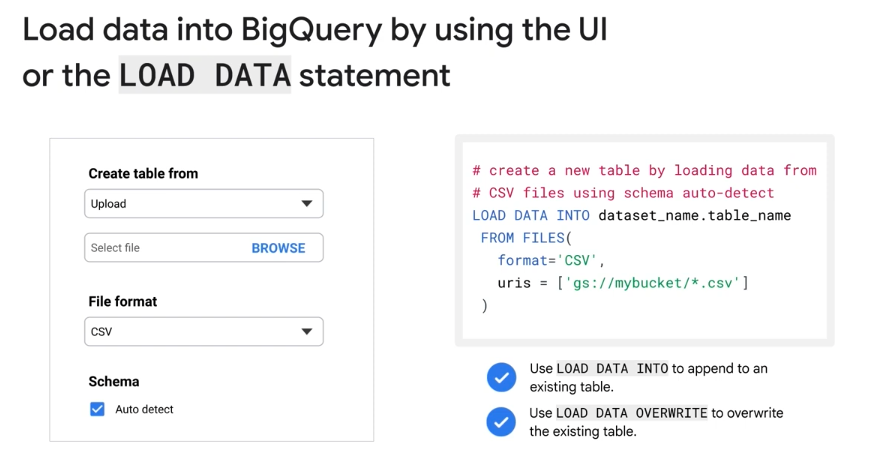
- BigQuery UI: A user-friendly graphical interface ideal for manual file uploads. It simplifies the process by allowing you to select files, specify formats, and even auto-detect the table schema.
LOAD DATASQL Statement: A programmatic method that provides more control, making it ideal for automation and embedding in scripts. It can be used to append data to or completely overwrite existing tables.